Hey everyone!
Today we've released version 26.0 of TurboActivate, TurboFloat, and TurboFloat Server. Get them now on your API page. Upgrade to version 26.0 immediately for the best performance and reduced customer complaints.
Among the many performance and security improvements and bug fixes, we've also added TLS 1.3 support for all platforms that support it (Linux, BSD, macOS, and Windows 11 and newer). This means faster and more secure connections to the servers. Old Windows (10 and lower) will fallback to TLS 1.2.
Also, we've added ARM64 support for customers targeting the FreeBSD operating system.
And, despite the "major" version bump (the last version was 4.4.4 and now we're releasing 26.0), there are absolutely no breaking changes!
"Semantic" versioning is a joke
Why did we bump the "major" version from 4 to 26.0 if there are no breaking changes? Because we released TurboActivate / TurboFloat 4.0 in 2016! That's almost a decade ago. We've been releasing "minor" versions with so many feature improvements and bug fixes in the time between, but we've always kept that "4" in front. But we want people to upgrade, so we're changing that 4 to another number.
Now the "major version" is just matching the year to make it easier at a glance for customers to know just how out of date their integrations are and fix them.
That's it: progress has been made and you should upgrade if you're on an old version.
If you're in the software programming field (and you likely are if you're still reading this), then you've likely heard of "semantic versioning". There are books, websites, and far too many hours of videos dedicated to the topic, but briefly it can summarized as the following (by the guy who birthed the idea):
Given a version number MAJOR.MINOR.PATCH, increment the:
MAJOR version when you make incompatible API changes
MINOR version when you add functionality in a backwards compatible manner
PATCH version when you make backwards compatible bug fixes
In other words, this is an engineer's solution to a marketing problem: well meaning, but wrong and naive.
Why is "semantic" versioning a thing? And why is it a wrong thing?
Semantic versioning is a thing because the guy who wrote a blog post ... I mean, "spec" ... about it is the co-founder of GitHub. Famous guy in programming writes something about programming and programmers glom onto it. Tale as old as time.
This guy is also a creep and a credibly-accused sexual harasser who got pushed out of GitHub for his — as the lawyers for GitHub wrote — "mistakes and errors of judgment" (i.e. sexual harassment).
But, "semantic" versioning isn't wrong and naive because Tom Preston-Werner is a credibly-accused sexual harasser and an all-around creep. Semantic versioning is bad because software is written by humans, purchased (or acquired) by humans, and put into commission and/or used by humans (or used by bots written by humans).
It's a robotic non-solution to a human problem. Namely: how do we convey when, how, and who should upgrade this software.
And the answer is simply that you cannot communicate all of those things through a version number. A few digits and some periods don't have enough expressiveness to reflect the complexity of software. The most you can communicate with a version number is that it's a different version number (and that's only if the customer even knows what version they're on!)
And, most importantly, "patch" and "bug" fixes can (and do) introduce "breaking changes". Sometimes the "breaking changes" only effect people doing silly things (like depending on obviously buggy behavior), but more often than not the "breaking changes" are a result of the bug fixes interacting with other software on the computer (whether the OS, the kernel, critical services, etc., etc.) that have their own bugs.
In other words: the world is complex. And software lives in this world. Trying to reduce this complexity to a version number is silly.
And because there's an XKCD comic for every silly programming controversy:
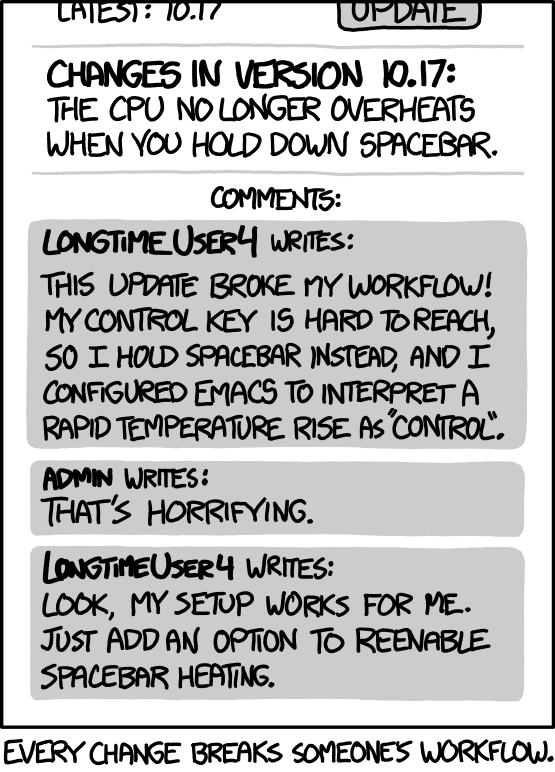
Lastly, Tom himself wrote another "spec" (blog post?) contradicting his original blog post ("spec"?) saying "Major version numbers are not sacred."
Yeah, no shit.
Now we have 2 contradicting opinions ... I'm sorry, "specs" ... on the same subject written by the same person. And he refuses to admit he was wrong. That's not entirely a surprise coming from Tom and his past credible accusations of sexual harassment and lack of acknowledgment or human emotions like, say, remorse.
A cynical person might say the "S" in "semantic version" stands for "sexual assault", but we all know it stands for "supply chain attack". See all the countless semantic version repositories (NodeJS's NPM, Python's pip, etc.) where an entire library was replaced with a malicious version all without "breaking" the version number.
Why all this over a version number?
We've never used "semantic" versioning and never will. We've always viewed it as a silly idea. However, because of the cargo-cult tendencies of the software industry, we get asked why we don't use it. Unfortunately an eye-roll isn't a good enough answer. So now you know. 🤷♂️
Wishing everyone happy holidays, happy new years, and a life filled with just a little less bullshit!
- Wyatt O'Day
Founder & CEO of wyDay